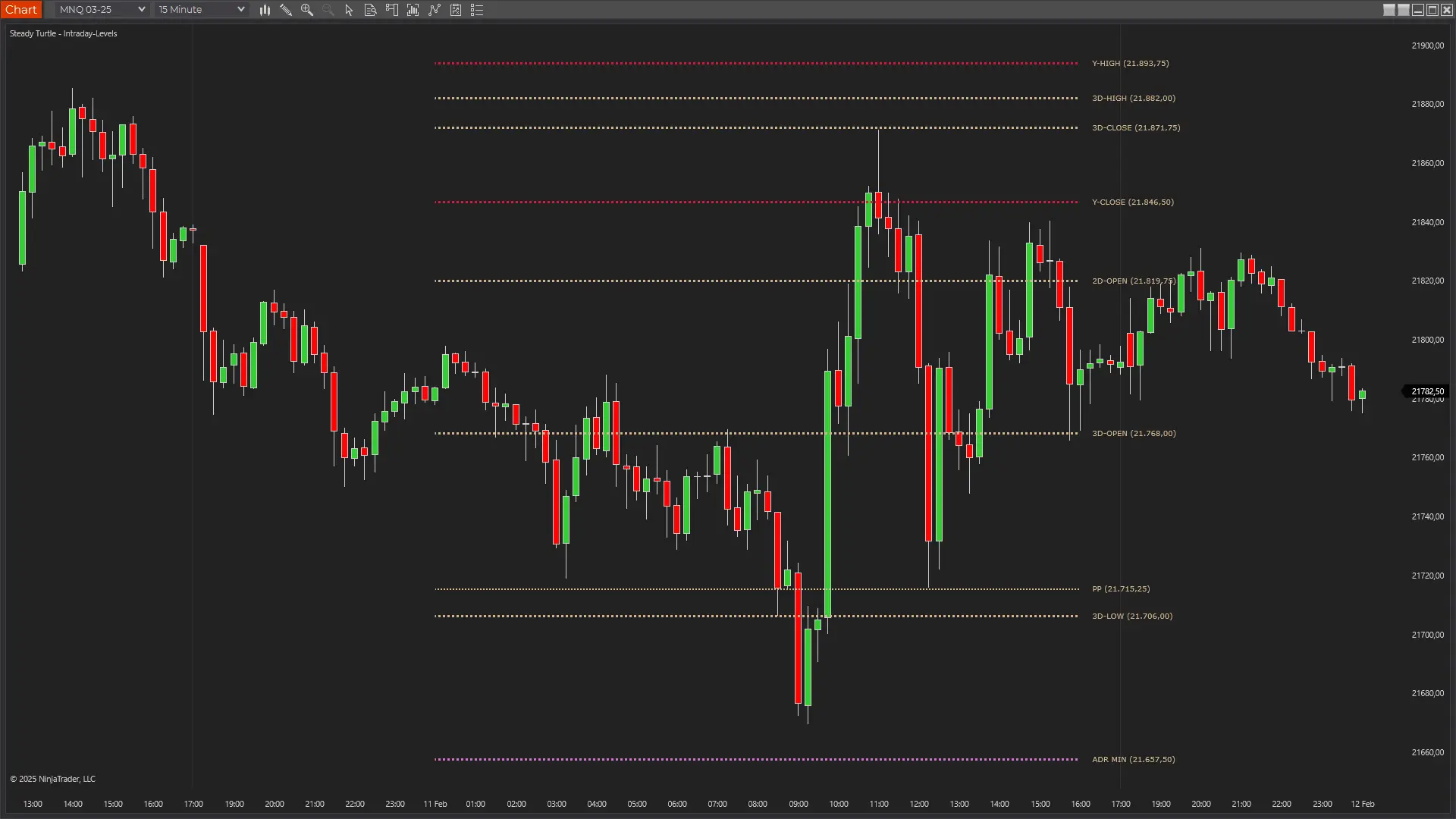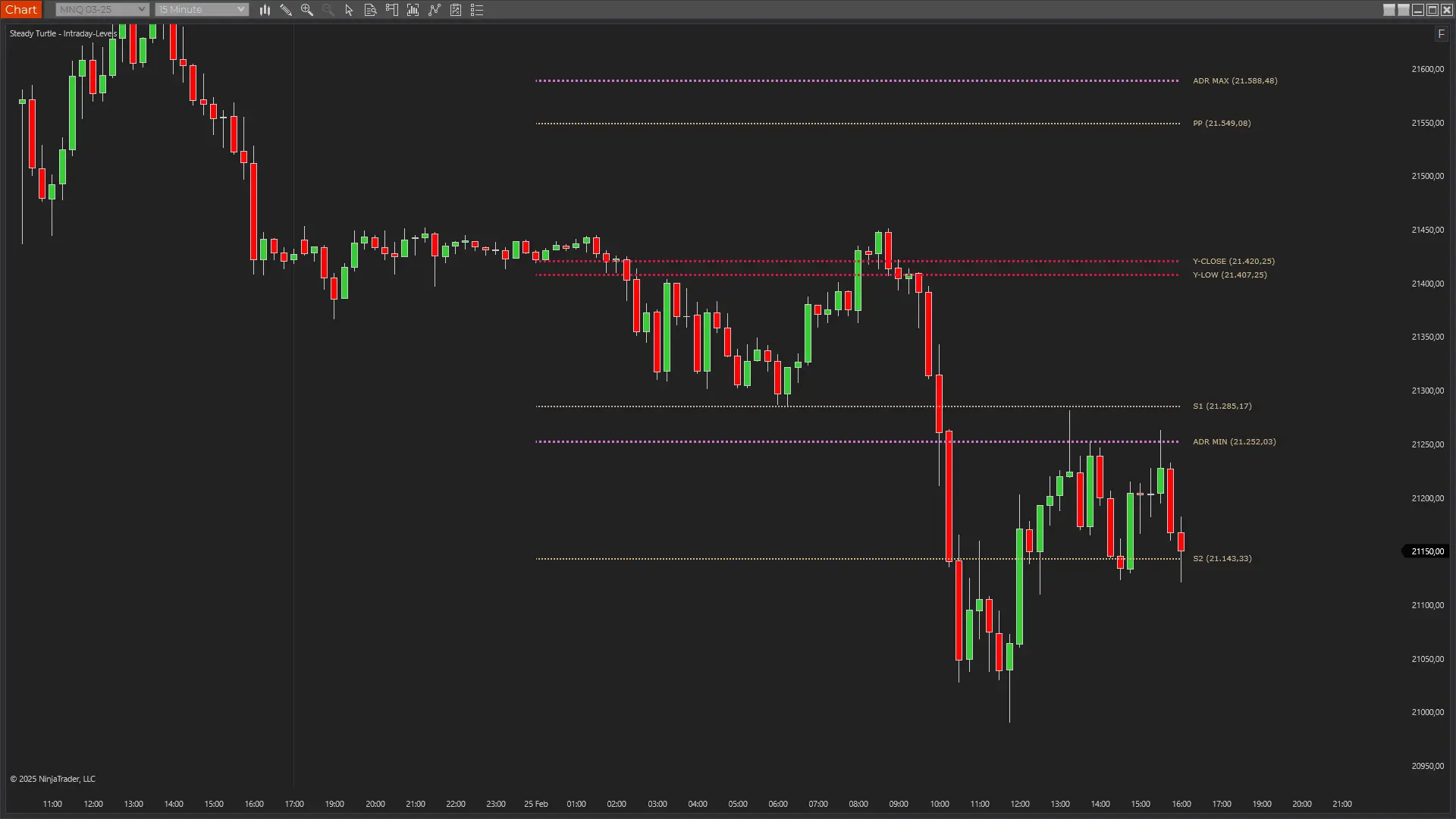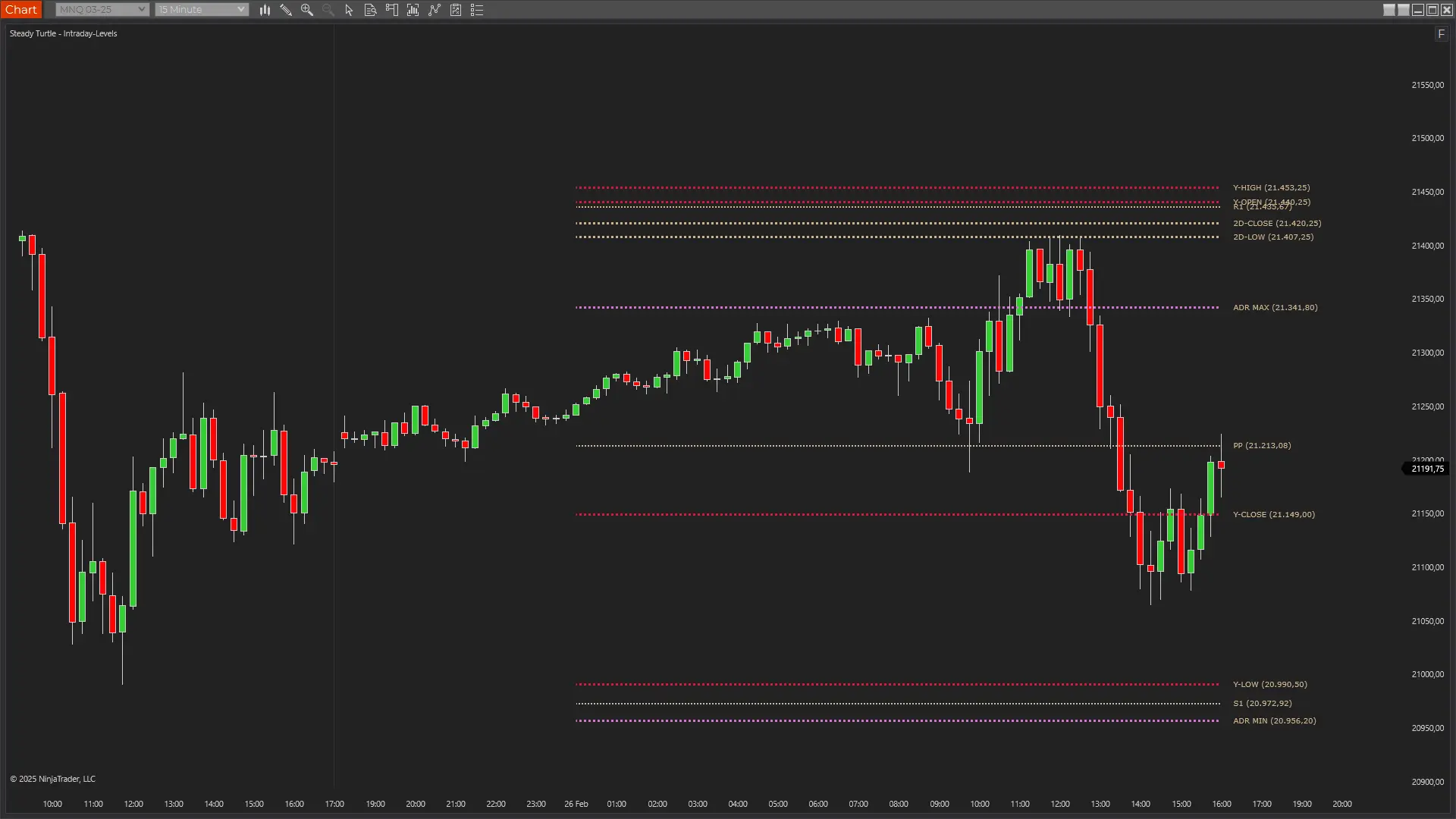
Intraday Key Levels for NinjaTrader 8
All the key reference levels futures traders need in one indicator. Automatically displays pivot points, yesterday's high/low/open/close, multi-day levels, weekly structure, and Average Daily Range projections — updated fresh each session.
See It in Action
Watch how the Intraday Levels indicator displays pivot points, prior day levels, and ADR projections on your NinjaTrader charts.
What Users Say
Trusted by futures traders worldwide
Saves me like 15 minutes every morning. Pivots, prior day, ADR—everything's already calculated when I open my chart.
Those ADR projections really helped my trade management. I used to aim for crazy targets. Now I know what's realistic based on normal daily movement.
Love that you can toggle stuff on and off. Some days I just want pivots, other days I want all the levels. Super flexible.
Those weekly levels are slept on. They give you context daily levels don't. When a daily pivot lines up with a weekly high or low, that's money.
Clean, no lag, levels are always spot on. I checked it against my own math and it matches perfectly. Does exactly what I need.
Yesterday's high and low are my go-to levels for that first hour. This makes sure I never forget to mark them.
Every Key Level, Automatically Calculated
Professional traders reference pivot points, prior day levels, and expected range projections every session. This indicator calculates all of them and draws them on your chart so you can focus on trading.
Daily Pivot Points
Calculates the classic pivot point formula using the prior day's high, low, and close. Displays the central pivot (PP) along with three support levels (S1, S2, S3) and three resistance levels (R1, R2, R3). These mathematically-derived levels are watched by traders worldwide.
Prior Day & Multi-Day Levels
Marks yesterday's open, high, low, and close as horizontal lines. Also displays 2-day ago and 3-day ago levels for broader context. These prior session levels often act as significant support and resistance zones.
Weekly Structure
Shows the prior week's open, high, low, and close. Weekly levels provide higher-timeframe context and often hold more significance than daily levels, especially for swing traders and position traders.
Average Daily Range (ADR)
Calculates the average range over the past 5 days and projects ADR Max and ADR Min levels from yesterday's close. These levels help you understand how far price typically moves and set realistic profit targets for the session.
Common Trading Applications
The Intraday Levels indicator provides objective reference points that many traders watch. Here's how these levels typically factor into trading decisions.
Pivot Point Reactions
Pivot points have been used by floor traders for decades. When price approaches the central pivot (PP) or any S/R level, traders watch for reactions. A bounce off a pivot level can signal a reversal opportunity, while a clean break through often leads to continuation toward the next level.
- PP often acts as the fair value for the day
- S1/R1 are the most commonly tested levels
- S3/R3 typically only reached on trending days
Prior Day Level Tests
Yesterday's high and low are significant because they represent the extremes of the most recent full session. Many traders watch for price to test these levels in the first hour of trading. A failed test of yesterday's high often leads to a move toward yesterday's low, and vice versa.
- Yesterdays high/low often act as magnets early in the session
- A break and hold above/below signals directional bias
- Yesterdays close provides a neutral reference point
ADR-Based Targets
The Average Daily Range tells you how far price typically moves in a session. When you enter a trade, you can use the ADR projections to set realistic profit targets. If price has already moved 80% of the ADR, the remaining potential may be limited—useful information for trade management.
- ADR Max/Min show expected session range boundaries
- Helps calibrate profit targets based on typical volatility
- Useful for identifying when a move may be overextended
On Real Futures Charts
See how the Intraday Levels indicator displays pivots, prior day levels, and ADR projections across different market conditions.
NinjaTrader Indicator Pricing & Packages
Choose the option that works best for your trading needs. All purchases include free lifetime updates and personal support from a fellow trader.
Single Indicator
Focus on one powerful tool that gives you a precise edge in identifying trading setups.
$49 /one-time
That's less than one losing trade
- 1 Indicator
- Lifetime updates
- Email support
Need more than one? Save 39% with the Starter Bundle →
Traders Starter Bundle
Get five essential professional trading indicators in one package. The smart way to get started.
$149 /one-time $245
Save 39% vs. buying individually — just $29.80 per indicator
- 5 Core indicators
- Initial Balance (IB), Intraday Key Levels, Inverse Fair Value Gap (iFVG), Opening Range Breakout (ORB), Overnight Sessions
- Lifetime updates
- Priority email support
Traders Complete Bundle
The full professional toolkit. All current and future indicators for traders who want every edge available.
$299 /one-time $980
Save 69% — just $29.90 per indicator, future ones included free
- Everything in Starter
- All Advanced Indicators
- Delta Profile, Dynamic Standard Deviations, Profit Forecast, Relative Volume (RVOL), Session-Anchored-VWAP
- All future indicators
- Lifetime updates
- Priority email support
Every session without the right tools is a session where you're trading blind.
Bundle prices increase as new indicators are added. Current pricing locks in all future additions.
What Happens After You Buy
Download link arrives in your email within seconds
Import into NinjaTrader with one click — step-by-step guide included
See levels, gaps, and session context on your charts by your next session
Built by a trader, for traders. Every indicator is hand-coded in C#, tested across thousands of sessions on ES and NQ, and updated based on real trader feedback. No outsourced code. No bloatware. Just tools that work.
Common Questions
- The indicator uses the classic floor trader pivot formula. The central pivot (PP) is calculated as (High + Low + Close) / 3 from the prior day. Support and resistance levels are then derived from the PP: R1 = (2 × PP) - Low, S1 = (2 × PP) - High, and so on for R2, R3, S2, S3. These are the same formulas used by professional traders for decades.
- The ADR is calculated by averaging the high-to-low range of the past 5 trading days. The ADR Max projection is yesterday\'s close plus half the ADR, and ADR Min is yesterday\'s close minus half the ADR. This gives you a statistically-based expectation for how far price might move during the current session.
- For full functionality, you need at least 5 days of daily data for the ADR calculation and the multi-day levels. Weekly levels require data from the prior week. The indicator will work with less data but may not display all level types. Loading 20+ days of history is recommended.
- Yes. Each level type (pivots, yesterday, daily, weekly, ADR) can be toggled on or off independently. You can also customize the color for each category. This lets you reduce chart clutter by showing only the levels you actually use in your trading.
Every Key Level, Every Session
Stop manually calculating pivots and marking yesterday's levels. The Intraday Levels indicator does it all automatically, so you can focus on finding trades.
One-time purchase · Lifetime updates · Instant download · 2-minute setup
Joined by 1,200+ NinjaTrader futures traders
Indicator Settings
Customize the indicator to match your trading preferences.
| Setting | Default | Description |
|---|---|---|
| Show Pivots | True | Show daily Pivot levels (R1-R3, PP, S1-S3) |
| Show Yesterday | True | Show Yesterday High/Low/Open/Close levels |
| Show Daily Levels | True | Show 2-day and 3-day ago levels |
| Show Weekly Levels | True | Show last week High/Low/Open/Close levels |
| Show ADR Levels | True | Show Average Daily Range levels |
| ADR Calc Mode | CloseCentered | CloseCentered: Prior Close +/- ADR/2. SessionExtremes: Low + ADR / High - ADR |
| Extend Lines Until (ET) | 16:00 | Lines stop drawing after this time (Eastern Time) |
| Max Sessions | 5 | Maximum number of sessions to display |
| Pivots Color | Tan | Pivot level line color |
| Pivots Line Style | Dot | Pivot level line dash style |
| Pivots Line Width | 2 | Pivot level line width (1-10) |
| Yesterday Color | Crimson | Yesterday level line color |
| Yesterday Line Style | Dot | Yesterday level line dash style |
| Yesterday Line Width | 3 | Yesterday level line width (1-10) |
| Daily Color | Tan | 2D/3D level line color |
| Daily Line Style | Dot | 2D/3D level line dash style |
| Daily Line Width | 3 | 2D/3D level line width (1-10) |
| Weekly Color | Tan | Last week level line color |
| Weekly Line Style | Dot | Last week level line dash style |
| Weekly Line Width | 3 | Last week level line width (1-10) |
| ADR Color | Orchid | ADR level line color |
| ADR Line Style | Dot | ADR level line dash style |
| ADR Line Width | 3 | ADR level line width (1-10) |
| Show Labels | True | Show level labels on chart |
| Show Price | True | Show price value in labels |
| Label Color | Tan | Label text color |
Show daily Pivot levels (R1-R3, PP, S1-S3)
Show Yesterday High/Low/Open/Close levels
Show 2-day and 3-day ago levels
Show last week High/Low/Open/Close levels
Show Average Daily Range levels
CloseCentered: Prior Close +/- ADR/2. SessionExtremes: Low + ADR / High - ADR
Lines stop drawing after this time (Eastern Time)
Maximum number of sessions to display
Pivot level line color
Pivot level line dash style
Pivot level line width (1-10)
Yesterday level line color
Yesterday level line dash style
Yesterday level line width (1-10)
2D/3D level line color
2D/3D level line dash style
2D/3D level line width (1-10)
Last week level line color
Last week level line dash style
Last week level line width (1-10)
ADR level line color
ADR level line dash style
ADR level line width (1-10)
Show level labels on chart
Show price value in labels
Label text color
Futures and forex trading contains substantial risk and is not for every investor. An investor could potentially lose all or more than the initial investment. Risk capital is money that can be lost without jeopardizing ones' financial security or life style. Only risk capital should be used for trading and only those with sufficient risk capital should consider trading. Past performance is not necessarily indicative of future results.
Testimonials appearing on this website may not be representative of other clients or customers and is not a guarantee of future performance or success.
Hypothetical performance results have many inherent limitations, some of which are described below. No representation is being made that any account will or is likely to achieve profits or losses similar to those shown; in fact, there are frequently sharp differences between hypothetical performance results and the actual results subsequently achieved by any particular trading program. One of the limitations of hypothetical performance results is that they are generally prepared with the benefit of hindsight. In addition, hypothetical trading does not involve financial risk, and no hypothetical trading record can completely account for the impact of financial risk of actual trading. For example, the ability to withstand losses or to adhere to a particular trading program in spite of trading losses are material points which can also adversely affect actual trading results. There are numerous other factors related to the markets in general or to the implementation of any specific trading program which cannot be fully accounted for in the preparation of hypothetical performance results and all which can adversely affect trading results.